



Modern teams don’t struggle with project management tools because they lack features. They struggle because those tools often require weeks of configuration just to start working.
You’ve probably seen it before: A team buys a powerful platform, then spends weeks setting up workflows, mapping statuses, and training people on how the system works.
By the time everything is configured, the team has already lost momentum.
This is the “configuration paralysis” problem—and it’s one of the biggest barriers to adopting new productivity tools.
Most legacy project management platforms are incredibly flexible—but that flexibility comes with complexity.
Enterprise teams often have to define dozens of elements before the tool becomes usable:
That complexity usually leads to external implementation consultants.
According to industry estimates, organizations often spend $5,000–$25,000 on implementation consulting alone, with migration projects taking 2–6 weeks depending on workflow complexity.
Even worse, the productivity impact during transitions can be severe. Teams can experience 20–30% productivity loss during the first 4–8 weeks of a new tool rollout due to training and workflow setup.
And the learning curve isn’t small. Some enterprise platforms require 2–4 weeks for teams to become comfortable with the system, especially when complex workflow configurations are involved.
In other words, teams aren’t just buying software—they’re buying setup time, training overhead, and configuration debt.
When organizations migrate from tools like Jira, Asana, or ClickUp, the hardest part is not importing tasks.
It’s mapping the workflow language.
Every team has its own way of describing work stages:
When moving to a new platform, these statuses must be translated correctly, or the entire workflow becomes fragmented.
This creates what many teams call the translation gap:
Because of this risk, many organizations delay migration entirely—even when they know their current tool is slowing them down.
For founders, operations leaders, and project managers, onboarding friction is a velocity killer.
Every day spent configuring software is a day not spent delivering outcomes.
Research from the Project Management Institute estimates that poor tools and inefficient workflows can cost organizations up to $1.3 million annually in lost productivity.
The companies that move fastest today are not the ones with the most complex systems—they’re the ones that can adapt their technology stack instantly.
That’s why modern platforms are shifting toward AI-native workflow configuration.
Instead of manually rebuilding workflows, modern AI-powered platforms allow teams to map statuses automatically during migration.
Here’s how the process works.
The easiest way to map custom project statuses without a consultant is to start with your existing workflow structure instead of rebuilding it from scratch.
When teams migrate between tools, the biggest risk is losing the meaning behind their workflow stages. Statuses like Awaiting Legal, Ready for PR, or Campaign Scheduled often represent critical internal processes. Recreating these manually can take hours—or even days.
With Kroolo, this process becomes dramatically simpler.
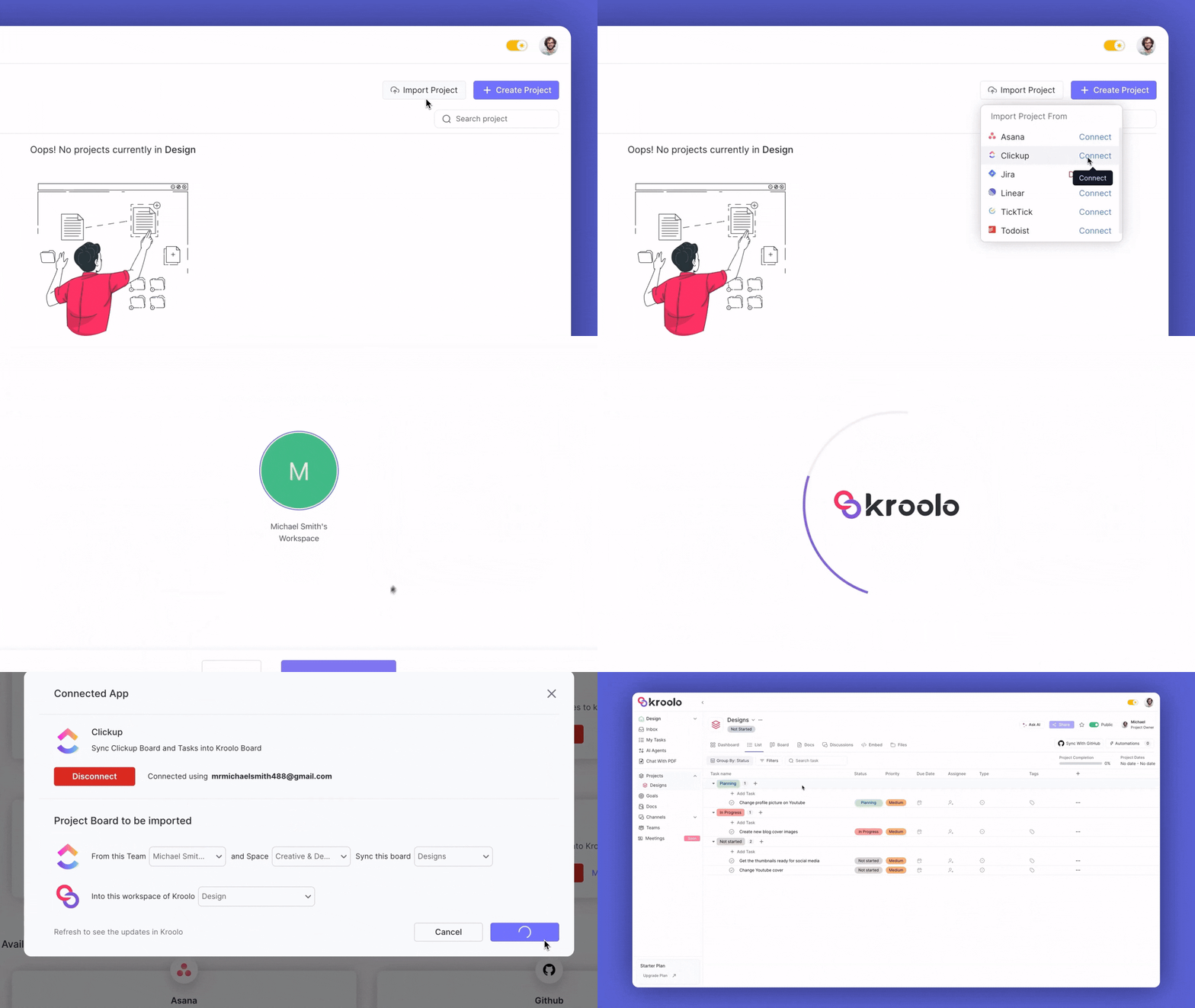
Using the native importer, teams can bring their entire project boards directly from platforms like ClickUp into Kroolo. The system imports not just tasks, but the entire project structure, including:
All project boards can then be organized into existing or new folders within Kroolo, allowing teams to consolidate multiple projects into one centralized workspace.
Because the workflow structure is imported intact, teams avoid the common migration challenge of manually re-mapping statuses or recreating board logic. Instead of spending weeks rebuilding processes, the project environment is ready almost instantly—making it possible to move from migration to execution in minutes.
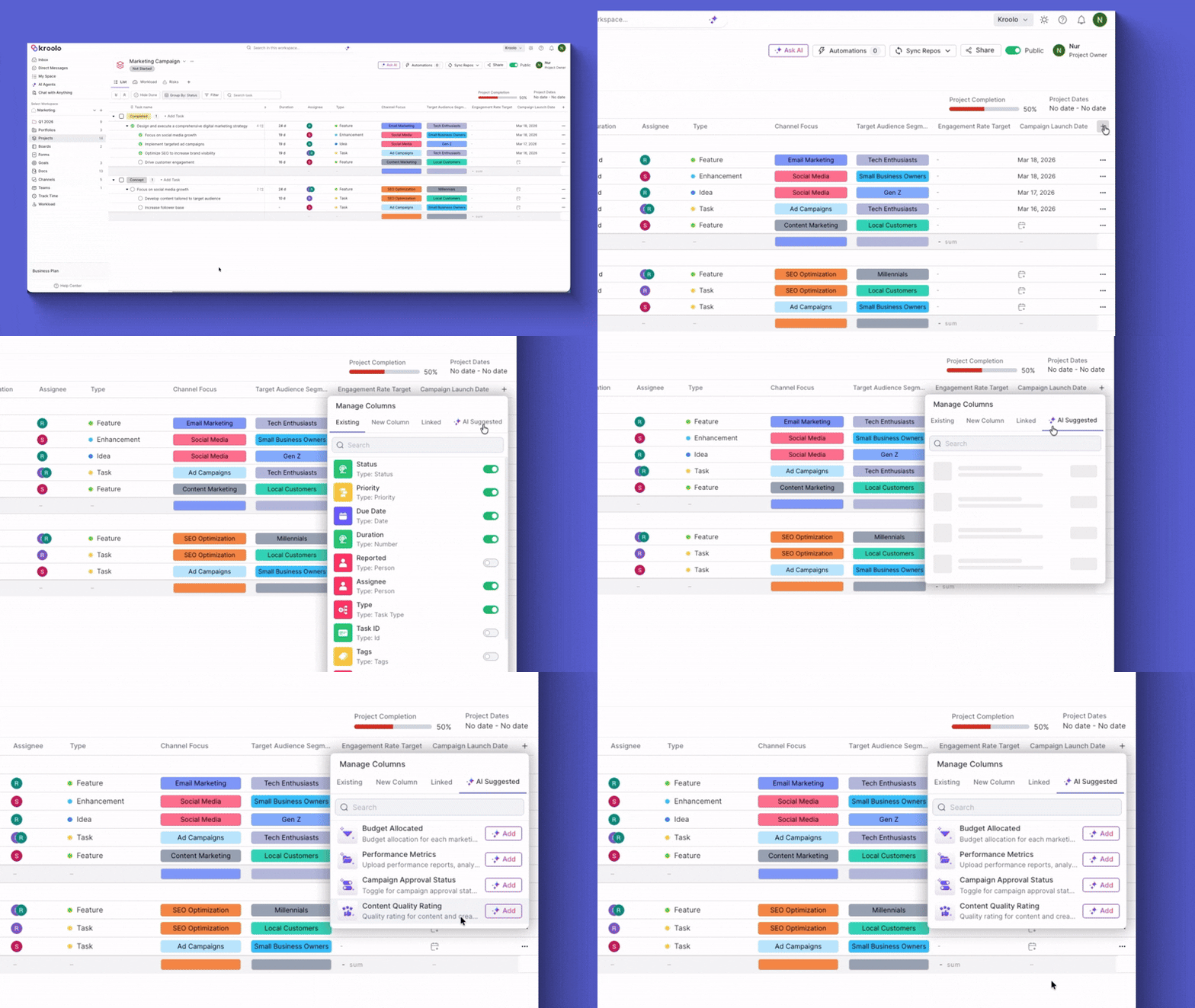
After projects are imported, Kroolo’s AI Custom Columns help structure and organize project data automatically—without the typical manual configuration.
In traditional project management tools, creating custom columns requires defining the column type, writing descriptions, and manually adding labels. When teams migrate complex workflows, this process becomes time-consuming and often requires external implementation help.
Kroolo removes that friction by introducing AI-suggested columns.
Instead of forcing teams to design their project structure from scratch, the platform analyzes the project data and recommends relevant columns that help organize the workflow more clearly.
For example, AI may suggest columns like:
Once selected, these columns can be easily customized with:
Teams can manually define labels or simply click Suggest, allowing AI to generate suitable options automatically based on the project context.
This intelligent column generation plays a key role in mapping custom statuses without consultant support. By automatically structuring and labeling project data, Kroolo ensures that teams can preserve the logic of their workflows while improving visibility across projects.
Instead of spending hours configuring fields and testing setups, teams can generate organized project structures in minutes, turning complex migrations into a smooth, self-service process
A growing marketing team managing multi-channel campaigns had built an extensive workflow inside ClickUp. Over time, their board evolved into a multi-phase campaign system with several custom stages such as:
While the workflow worked well internally, the team began experiencing increasing friction with the platform’s complexity. Every update to statuses or fields required manual configuration, and onboarding new team members meant explaining a complicated setup.
When the team decided to move to Kroolo, their biggest concern was workflow migration.
Their campaign board contained dozens of tasks, multiple owners, and custom statuses unique to their internal process. Traditionally, migrating such workflows requires:
In most organizations, this process can take days or even weeks, often requiring external implementation consultants.
The marketing team wanted to avoid exactly that.
Instead of rebuilding their workflow manually, the team used Kroolo’s Native 1-Click Importer.
With a single import action, Kroolo pulled their campaign board directly from ClickUp, including:
Once the data was imported, Kroolo’s AI-native architecture analyzed the workflow automatically.
The system quickly recognized the structure of the campaign process and intelligently mapped custom statuses such as:
Rather than forcing the team to recreate these stages manually, Kroolo automatically aligned them inside the new workspace, preserving the original workflow logic.
The result: no status mapping, no configuration, and no manual rebuilding.
Within minutes, the marketing team’s campaign board was fully operational inside Kroolo.
Key outcomes included:
5-minute migration
The entire board—including custom statuses and tasks—was imported and ready to use in under five minutes.
AI-driven workflow mapping
Custom stages like “Awaiting Legal” and “Ready for PR” were automatically recognized and mapped correctly.
Zero consultant costs
The team avoided the typical $5,000+ implementation fees associated with configuring complex workflows.
Immediate productivity
Because the workflow structure remained intact, the team resumed campaign execution immediately after migration.
For many teams, software migration is delayed for months because of the fear of breaking workflows.
Custom statuses, especially in marketing or product operations, represent the language of how work moves through an organization. Losing that structure during migration can disrupt productivity.
Kroolo eliminates that risk by using AI-driven workflow interpretation, allowing teams to migrate complex boards without:
Instead of spending weeks configuring software, teams can focus on executing campaigns and delivering results.
The marketing team didn’t just switch tools.
They eliminated the setup tax that usually comes with adopting a new project management system.
By moving from ClickUp to Kroolo, they transformed a process that normally takes weeks of configuration into a 5-minute migration.
And most importantly—they never had to hire a consultant just to map their statuses.
Conclusion
The core takeaway is simple: software should adapt to your workflow — not force you to adapt to the software.
For years, teams have accepted the idea that setting up a project management tool requires weeks of configuration, long onboarding sessions, and sometimes even external consultants. But in reality, a productivity tool shouldn’t create another layer of operational overhead.
The era of consultant-led implementation for everyday work tools is fading.
Modern teams need platforms that deliver immediate value, not systems that require certifications just to update a project status. With AI-native platforms like Kroolo, workflows can be understood, mapped, and activated automatically—eliminating the setup tax that slows organizations down.
Instead of spending time configuring columns, mapping statuses, and rebuilding workflows, teams can focus on what actually matters: executing projects, delivering outcomes, and moving the business forward.
In other words, the shift is clear:
from configuration fatigue to automated execution.
The First TRUE AI WorkOS is here. Don’t let a steep learning curve hold your team back from adopting a modern, faster tech stack.
With Kroolo, you can experience the power of 1-click migration and intuitive status mapping, with no seat minimums and no consultants required.
Sign up for free and migrate your first project board in less than 5 minutes.